GOOD NEWS TO JAMB APPLICANTS: JAMB NOW ALLOWS CANDIDATES TO CHANGE LOST SIM CARDS AND EMAIL ADDRESSJAMB Sets to Transform UTME Structure With Life Skills and Critical Thinking AssessmentJAMB Introduces National Digital Pre-Registration App for 2027 UTME RegistrationOOU Releases 2026/2027 Post-UTME Results — See How to CheckASUU THREATENS FRESH NATIONWIDE STRIKE OVER SALARIES AND 2025 AGREEMENTJAMB INTRODUCES NEW ADMISSION STATUS: SEE THE MEANING OF PROPOSED, RECOMMENDED, IN PROGRESS, ADMITTED AND NOT ADMITTEDFEDERAL POLYTECHNIC EDE (EDEPOLY) BEGINS UPLOADING 2026/2027 ADMISSION LIST VIA JAMB CAPS2026/2027 FUNAAB Orientation Programme for Newly Admitted Fresh Students to Commence Monday, September 14NECO Result Checker Token: Has NECO Changed the Usage Policy From 5 Checks to 1 Check?JAMB Releases 2026 UTME Results of Underage Candidates
GOOD NEWS TO JAMB APPLICANTS: JAMB NOW ALLOWS CANDIDATES TO CHANGE LOST SIM CARDS AND EMAIL ADDRESSJAMB Sets to Transform UTME Structure With Life Skills and Critical Thinking AssessmentJAMB Introduces National Digital Pre-Registration App for 2027 UTME RegistrationOOU Releases 2026/2027 Post-UTME Results — See How to CheckASUU THREATENS FRESH NATIONWIDE STRIKE OVER SALARIES AND 2025 AGREEMENTJAMB INTRODUCES NEW ADMISSION STATUS: SEE THE MEANING OF PROPOSED, RECOMMENDED, IN PROGRESS, ADMITTED AND NOT ADMITTEDFEDERAL POLYTECHNIC EDE (EDEPOLY) BEGINS UPLOADING 2026/2027 ADMISSION LIST VIA JAMB CAPS2026/2027 FUNAAB Orientation Programme for Newly Admitted Fresh Students to Commence Monday, September 14NECO Result Checker Token: Has NECO Changed the Usage Policy From 5 Checks to 1 Check?JAMB Releases 2026 UTME Results of Underage Candidates
How to accept admission on JAMB CAPS and what next after you have been admitted - what every Applicants should know

By admin 2 months ago
Every 2026/2027 UTME/DE applicants should Read this to the end
If your school has released admission and your name appears on the list, the next and most important step is to accept your admission on JAMB CAPS.
Many candidates lose their admission every year because they did not know how to accept it properly or what to do after. This guide will show you exactly how to accept admission on JAMB CAPS and what to do next to secure your admission for the 2026/2027 academic session.
What is JAMB CAPS?
JAMB CAPS means Central Admission Processing System. It is the platform where schools upload admitted candidates and where candidates accept or reject admission offers from JAMB and from schools. No admission is considered valid until you accept it on JAMB CAPS.
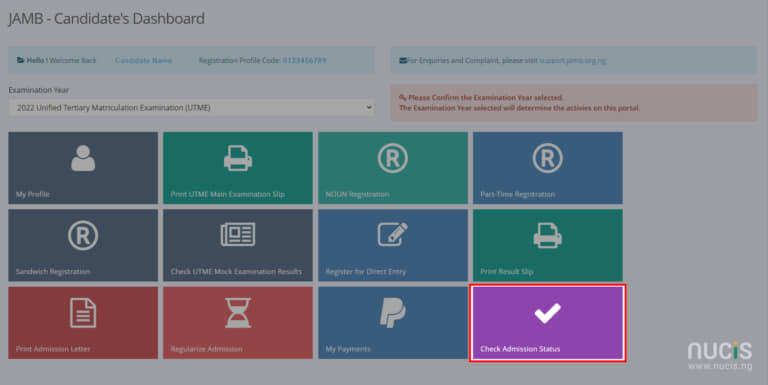
How To Accept Admission on JAMB CAPS 2026/2027
To accept your admission on JAMB CAPS, Follow these steps carefully:
1. Visit the JAMB CAPS Portal: Go to https://efacility.jamb.gov.ng
2. Login: Enter your JAMB Email and Password. If you forgot it, use the "Reset Password" option.
3. Click on "Check Admission Status": You will find it on the left side menu.
4. Click on "Access my CAPS": Click the button to enter CAPS.
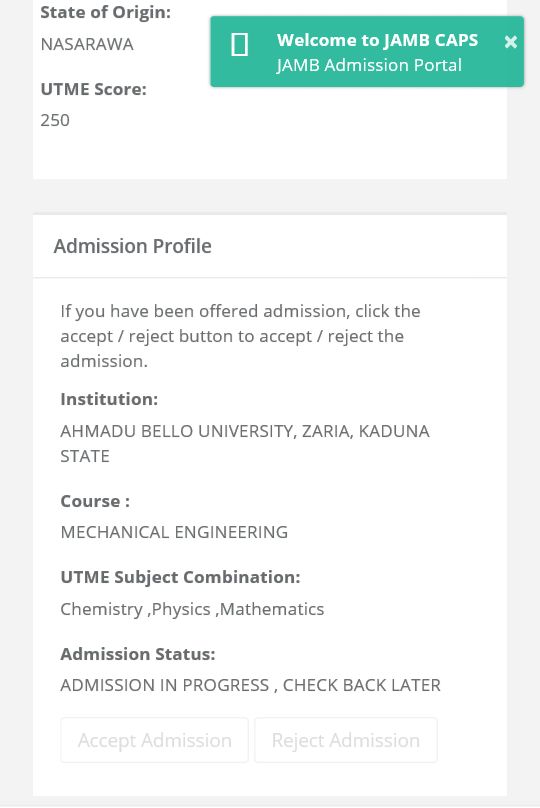
5. Click on "Admission Status": Wait for the page to load. It may take time due to traffic.
6. If You Have Been Admitted: You will see "CONGRATULATIONS! YOU HAVE BEEN OFFERED PROVISIONAL ADMISSION". Or "ADMISSION IN PROGRESS"
Note: If you see "Admission in Progress", it means your school has not uploaded you yet. Keep checking.
If you see any of the Response in 6 on your dashboard, it means your dream is coming through but read this to the end in order not to become a victim later
To Accept, you can accept your admission in 2 ways
1. Candidates that still have the phone number they used to generate profile code: If you still have the phone number you used to generate profile code while registering for JAMB, you can use USSD by following these steps
- Go to your phone SMS
- Type your JAMB registration number then space and type ACCEPT E.g 202661234567XY ACCEPT where 202661234567XY is the candidate's JAMB registration number
- Send it to 55019 or 66019
What To Do Next After Accepting Admission on JAMB CAPS
2. For Candidates that have lost the phone number they used to generate profile code: if you have lost the phone number you used to generate profile code while registering for JAMB, Follow these steps
- Visit any accredited CBT center
- Tell them you want to accept or Reject admission
- You will be allowed to do Biometric thumbprint for the confirmation of your choice (Note: the service is not free at CBT centers.
Accepting admission is not the end. Here are 7 important things every admitted candidate must do next:
1. Print Your JAMB Admission Letter
After accepting, go back to JAMB e-facility and print your JAMB Admission Letter. Schools will ask for it during registration and NYSC. It costs about 1500 on the portal.
2. Print Your JAMB Result Slip
Print both the original and coloured copy of your JAMB result slip from the JAMB portal. This is also required for clearance.
3. Pay Acceptance Fee on School Portal
Go to your school portal and pay the acceptance fee within the deadline given by the school. Failure to pay may lead to forfeiture of admission.
4. Upload O’Level Results on JAMB CAPS
If you have not uploaded your WAEC/NECO/NABTEB results on JAMB CAPS, do it immediately at any JAMB CBT centre. Without this, you cannot be matriculated.
Note: Most Institutions will not admit any candidate that has not uploaded his/her O'level on JAMB CAPS
5. Do Change of Course/Institution if Needed
If JAMB admitted you for a different course from what you applied for, you can do "Change of Course" on JAMB portal before paying acceptance fee. Once you pay, it means you have accepted the course.
6. Proceed to School for Screening and Clearance
Go to your school with your credentials for physical screening. Required documents usually include: JAMB result slip, O’level result, Birth Certificate, Local Government Identification, JAMB Admission Letter, Passport photographs.
7. Pay School Fees and Begin Registration
After clearance, pay your school fees and complete your departmental and faculty registration. Then you are officially a student.
Important Warnings For All Candidates
1. Do Not Pay Money to Any Agent: All payments should be made only on JAMB portal or your school portal.
2. Accept Admission Once: If you accept, then reject later, you may have issues.
3. Deadline Matters: Schools give deadlines for acceptance fee and registration. Treat it as urgent.
4. Keep Checking CAPS: If you applied to multiple schools, you may get more than one offer. Choose wisely before accepting.
Common Questions
Question: What if I mistakenly rejected my admission?
Answer: This is dangerous though, but you can contact JAMB office immediately or visit a JAMB CBT centre for help. It can sometimes be reversed. But not certain.
Question: Can I accept admission on phone?
Answer: Yes, but only if you still have the phone number you used to generate profile code during the UTME registration as written earlier.
Conclusion
Accepting your admission on JAMB CAPS is the first legal step to becoming a student. After that, follow your school’s instructions quickly to avoid issues.
Congratulations to all candidates offered admission for 2026/2027. We wish you success in your academic journey.
Is this Post helpful? Kindly drop your comment in the comment box.

Author: Taiwo Dolapo
About author
A computer scientist and an educationist
Comment on this post
Comments


Join our WhatsApp group for real-time updates, exclusive news and admission guidance and counselling.
 Join Our whatsApp group
Get answers to all your questions from our experts, be guided and stay informed on all updates - ask questions
RELATED POSTS
QUICK HELP

USEFUL LINKS
-
Polytechnic Admissions
School of Nursing
Upload Your O'Level Result to JAMB CAPS
Get your JAMB Admission Letter
College of Education
IJMB Updates
Get your Original JAMB Result
JAMB Latest News and Guidelines
Admissions Updates
Postgraduate News
NYSC, Senate List & Mobilization
Foreign Scholarships
Local Scholarships
POST UTME News & Updates
